How to Track AI Prompts: A Step-By-Step Guide (Manual + Tools)

A few years ago, “visibility” meant one thing: where you ranked on Google. Now your buyers are just as likely to ask ChatGPT, Perplexity, or Gemini for a recommendation before they ever open a search results page — and if your brand doesn’t show up in that answer, you simply don’t exist to them.
Prompt tracking is how you find out whether that’s happening.
In this guide, we’ll break down what prompt tracking actually is, how to run it manually if you’re just starting out, and how to scale it with tools like Rankseer and Semrush One once you’re ready to monitor this properly. By the end, you’ll have a checklist you can run through on your own.
TLDR: How to do AI Prompt Tracking
- Prompt tracking is the practice of monitoring how AI models like ChatGPT, Perplexity, and Gemini answer specific questions, and whether your brand gets mentioned, cited, or recommended in the response.
- It’s the AEO/GEO equivalent of keyword rank tracking, except there’s no “position 1” to chase. You either show up in the answer, or you don’t.
- You can do it manually with a spreadsheet, a shortlist of prompts, and some discipline running them on a schedule.
- You can do it at scale with an AI SEO tool like Rankseer or Semrush One, which automate the running, logging, and trend-reporting for you across multiple AI engines.
- Either way, the workflow is the same: pick your prompts, run them consistently, log what comes back, and turn the gaps into a content plan.
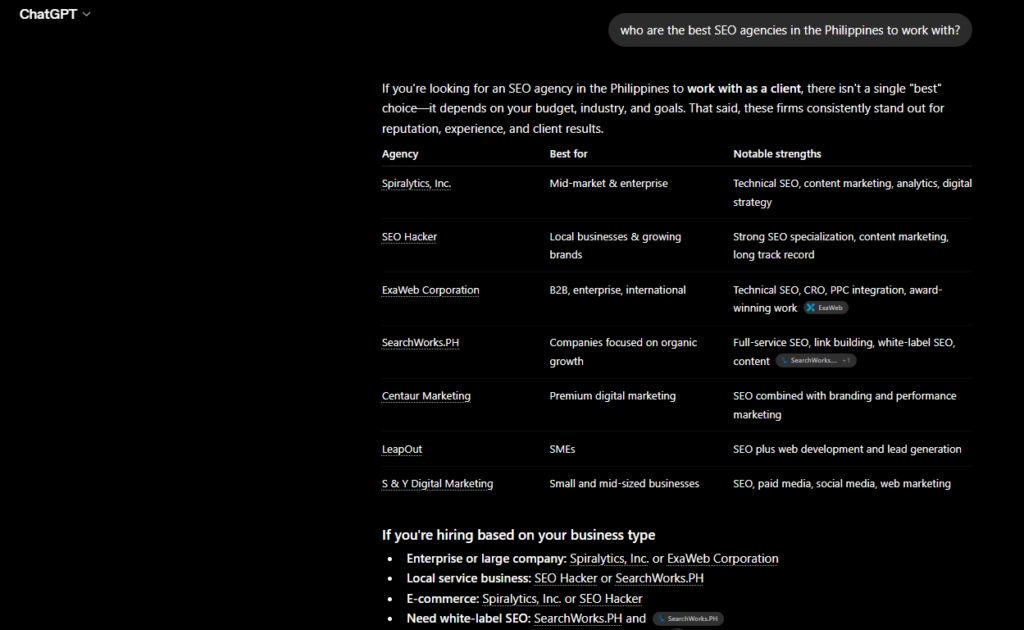
What Is Prompt Tracking?
Prompt tracking is the process of monitoring how AI search tools respond to specific questions over time, so you can see whether your brand is mentioned, how it’s positioned against competitors, and how that changes.
Instead of asking “where do I rank for this keyword,” you’re asking “does this AI tool mention me when someone asks this question, and what does it say about me?”
This distinction matters because AI-generated answers don’t work like search results pages. There’s no list of ten links you can climb. There’s a single synthesized answer, and your brand either made it into that answer or it didn’t. Some tools call this your AI Share of Voice — the tracking is what feeds that number.
A basic prompt tracking record for one prompt should tell you:
- Was the brand mentioned at all (we call that an inclusion or mention)
- Where it was mentioned — first, buried in a list, or only as an “alternative”
- What competitors showed up alongside it, and in what order
- How the brand was described — positively, neutrally, with caveats
- Which sources the AI leaned on to generate that answer, if the engine shows citations
Track that consistently across a set of prompts and you have a real, repeatable picture of your AI visibility — not a one-off screenshot that happens to look good.
Why a Single Check Isn’t Enough
AI answers aren’t static. The same exact question, asked twice, can return two different brand lists. That’s the nature of how these models generate responses — they’re not pulling from a fixed index the way Google pulls from its ranking algorithm.
That’s exactly why tracking beats checking. One good-looking answer today tells you nothing about tomorrow. A tracked prompt, run on a consistent schedule, tells you whether your visibility is improving, holding steady, or quietly slipping while a competitor takes the spot you used to hold.
How to Track AI Prompts Manually
You don’t need a subscription to start. If you’re testing the waters or working with a small brand, you can build a lean manual system with a spreadsheet and a bit of routine. Here’s how.
Step 1: Build a Short List of Prompts
Start small — five to fifteen prompts is plenty to begin with. Pull questions from three buckets:
- Branded: questions that include your brand name (useful for sentiment, not for measuring true visibility)
- Comparison: questions that frame a choice without naming a winner (“best options for X”)
- Non-branded: category-level questions with no brand mentioned at all — this is where the real signal lives
We’re intentionally not going deep into how to choose the right prompts here — that deserves (and will get) its own dedicated guide. For now, just make sure your list leans toward non-branded and comparison questions rather than branded ones, since branded prompts will almost always mention you and tell you very little.
Step 2: Pick Your AI Engines
Decide which AI tools you’ll actually run these prompts on. Most teams start with ChatGPT and Google’s AI Overviews since they carry the most everyday search volume, then add Perplexity or Gemini depending on their audience and category.
Step 3: Run the Prompts and Log the Results
Open a spreadsheet with columns like:
- Prompt
- Engine/Platform
- Date
- Brand Mentioned?
- Position/Order
- Competitors Mentioned
- Sentiment
- Cited Sources
Then manually type each prompt into the AI tool, and log:
- Whether your brand appeared
- Where it appeared relative to competitors (first, middle, last, or only as an “alternative”)
- What tone the AI used to describe you
- Any sources it cited, if the tool shows them
Do this for every prompt, on every engine you’re tracking.
Step 4: Repeat on a Fixed Schedule
Pick a cadence and stick to it — weekly is a good starting point, monthly at minimum. Run the exact same prompts, worded the exact same way, each time. Consistency in wording is what makes the data comparable across weeks.
Step 5: Look for Patterns, Not Single Data Points
After three or four cycles, start comparing rows. Ask yourself:
- Are we consistently missing from the same handful of prompts?
- Which competitors keep showing up in our place?
- Are the same domains getting cited every time we’re absent?
- Is our sentiment shifting, even where we’re still being mentioned?
Every “no” in your Brand Mentioned column is a content brief. If a non-branded prompt consistently leaves you out, that’s a page you need to write, strengthen, or get cited from elsewhere.
The Honest Limitation of Doing This Manually
Manual tracking works, but it doesn’t scale past a handful of prompts and one or two engines before it turns into a part-time job. There’s no historical trend graph, no automatic competitor benchmarking, and no way to catch subtle sentiment shifts across dozens of prompts a week. That’s the point where most teams move to a dedicated tool.
How to Track AI Prompts Using Tools
Once you’re past the “just testing this out” phase, the manual spreadsheet becomes the bottleneck, not the AI engines. Tools automate the running, logging, and trend-tracking so you can spend your time acting on the gaps instead of chasing screenshots. Here are two worth knowing.
Rankseer
Rankseer is built as an all-in-one SEO + AEO platform, meaning prompt tracking sits alongside your traditional SEO workflow rather than living in a separate tool.
Inside Rankseer, this shows up mainly through its AI Share of Voice Tracking and SOV Trends features, which measure how often AI answers mention your brand against competitors and turn those one-off checks into an ongoing trend line you can watch move week over week.
It also runs an AI Readability Scanner and AEO Citation Gap Analyzer, which help you understand why you might be missing from an AI answer in the first place — whether your pages are structured in a way AI engines can actually parse, and where you’re missing the citations that would help you get pulled into a response.
What makes this useful for prompt tracking specifically is that it’s connected to the rest of your campaign: your keyword research, site audit, and content workflows sit in the same workspace, so when a tracked prompt shows a gap, you can move straight into an AI Blog Writer or Landing Page Builder workflow to close it, without switching tools or re-explaining your brand context.

Semrush One
Semrush One takes a similar “SEO and AI in one place” approach, but with the weight of Semrush’s long-standing keyword and backlink data behind it.
Its prompt monitoring capability is built on what Semrush describes as one of the largest LLM prompt databases available, covering hundreds of millions of prompts, which it uses to help you discover the topics and questions actually driving demand in your category, and to track your brand’s presence and mentions in AI responses over time.
And because it’s part of the same suite as Semrush’s traditional SEO toolkit, you can pair prompt-level AI visibility with keyword rankings, content gap analysis, and backlink data — useful when you want to connect an AI visibility gap back to a concrete keyword or content opportunity rather than treating it as an isolated problem. Try their 7-day free trial if you want to test this tool’s prompt tracking features.
Choosing Between Manual and Tools
Manual Tracking AI SEO Tools Best for Small brands, early testing, a handful of prompts Ongoing programs, multiple engines, competitive tracking Setup effort Low (a spreadsheet) Moderate (account setup, prompt/topic config) Scales past ~15 prompts Not realistically Yes Historical trending Manual, easy to lose consistency Built-in Competitor benchmarking Manual, time-consuming Automated Connects to content/SEO action You do this yourself Built into the same workflow
Neither approach is “wrong.” Start manual if you’re validating that this matters for your brand. Move to a tool the moment tracking more than a dozen prompts across multiple engines, every week, starts eating hours you don’t have.
Your AI Prompt Tracking Checklist
Use this as your working checklist, whether you’re doing this manually or inside a tool:
- Built an initial list of 5–15 prompts (leaning non-branded and comparison)
- Decided which AI engines to track (start with ChatGPT and Google AI Overviews)
- Set up a log — spreadsheet or tool — with mention, position, competitors, sentiment, and cited sources as columns
- Picked a tracking cadence (weekly recommended) and committed to it
- Kept prompt wording identical across every tracking cycle
- Reviewed results after at least 3–4 cycles before drawing conclusions
- Flagged every prompt where you’re absent as a content or citation opportunity
- Flagged repeat competitor mentions to understand who you’re actually losing to
- Reassessed after a month whether manual tracking is still sustainable, or whether it’s time for a tool like Rankseer or Semrush One
Key Takeaway
Prompt tracking turns AI visibility from a guess into a measurable, repeatable practice. Start manual if you want to prove this matters to your brand first. Move to a tool like Rankseer or Semrush One the moment your prompt list, your engine list, or your reporting needs outgrow a spreadsheet.
Either way, the principle stays the same: track consistently, treat every missed prompt as a content brief, and revisit your results often enough to catch the trend before your competitor does.
FAQs on AI Prompt Tracking
What is AI prompt tracking?
AI prompt tracking is the practice of monitoring how AI tools like ChatGPT, Perplexity, and Gemini respond to specific questions over time, so you can measure whether your brand is mentioned, how it’s positioned, and how that changes.
How is prompt tracking different from keyword rank tracking?
Keyword rank tracking measures your position on a search results page. Prompt tracking measures whether your brand appears at all inside an AI-generated answer, since there’s no ranked list to climb.
How often should I track my prompts?
Weekly is a solid default for most brands. Daily makes sense around a launch, campaign, or when you’re watching for the impact of a specific change. Monthly is the bare minimum to spot meaningful trends.
Can I track AI prompts for free?
Yes — a manual spreadsheet and a disciplined schedule can get you started at no cost. It just won’t scale past a small prompt set before a dedicated tool becomes worth the investment.
Do I need to track every AI engine?
No. Start with the one or two engines your audience actually uses, based on where your AI referral traffic is already coming from, then expand from there.
